From one of the Harold and Kumar Movies, apparently.
I fear that I will always be
A lonely number like root three.
A three is all that's good and right,
Why must my three keep out of sight.
Beneath a vicious square root sign
I wish instead I were a nine.
For nine could thwart this evil trick,
With just some quick arithmetic.
I know I'll never see the sun, as 1.7321
Such is my reality, a sad irrationality,
When hark! What is this I see,
Another square root of a three
Has quietly come waltzing by,
Together now we multiply
To form a number we prefer,
Rejoicing as an integer.
We break from our mortal bonds,
And with a wave of magic wands.
Our square root signs become unglued,
And love for me has been renewed.
Saturday, October 19, 2013

Graphs #hashtag

Friday, October 18, 2013
For the Movies #hashtag
Freep: With need for nuclear weapons questioned, builders find a new target - errant asteroids
So we have all these scientists who know how to build bombs that would be used to fight an unwinnable war against a country that no longer exists and we need to find something to do to keep them busy. Basically, we're having them Fact Check "Armageddon"/"Deep Impact". I can't figure out if I think this is awesome or ridiculous.
So we have all these scientists who know how to build bombs that would be used to fight an unwinnable war against a country that no longer exists and we need to find something to do to keep them busy. Basically, we're having them Fact Check "Armageddon"/"Deep Impact". I can't figure out if I think this is awesome or ridiculous.
Thursday, October 17, 2013
Monday, October 14, 2013
Digital Footprints #hashtag
I got my first e-mail address on May 16, 1997. I used it through high school and college until I finally got my current Gmail account. I recently tried to delete the account and was unsuccessful. I signed in and searched but could not find instructions about how to delete the account. So, somewhere on the internet, there is a Juno e-mail address with an embarrassing username that will send e-mails to me (for the next sixty days until the account goes inactive again).
So I started searching for what other items I have left hanging around the internet. I found a Yahoo! account and deleted that. I found my webpage and I'm working on deleting that. I found my LiveJournal account and I am saving a personal copy of that and then deleting the account. It is just a matter of going out there and making that digital footprint a little smaller.
If you are interested in searching for someone, check into Spokeo or Pipl. It is also good for finding out accounts that you might still have floating around.
So I started searching for what other items I have left hanging around the internet. I found a Yahoo! account and deleted that. I found my webpage and I'm working on deleting that. I found my LiveJournal account and I am saving a personal copy of that and then deleting the account. It is just a matter of going out there and making that digital footprint a little smaller.
If you are interested in searching for someone, check into Spokeo or Pipl. It is also good for finding out accounts that you might still have floating around.
Learning with Technology/ EduBlogger (ED504)

Behind this pretty picture is my backpack. It has a couple of binders, two Geometry books, a teaching Middle/High School Mathematics books and a Diff Eq book. It makes my back hurt. I can't wait for the day when all textbooks are digital. Dan Meyer writes about his disappointment with digital textbooks. For Dan, the difference between conventional textbooks and e-books is not different enough. Both just present the information with little interaction between the reader and the text. In Dan's world, textbooks would include social networking. Students would be able to modify the text and offer alternate examples and explanations. Rather than reading a problem that said to "draw an octagon" students would be prompted to take a picture of an octagon (e.g. a stop-sign or MMA ring). The textbook would include basic quizzes and integrated formative assessment tasks. He sees the current world of digital textbooks and looks longingly to a future of interactive learning applications.
For me, I have much lower expectations. For the $150 or so a Kindle Fire retails for, I already get a lot. I can search documents. Documents can be automatically updated and can include hyperlinks. I can watch videos and listen to podcasts. From a literature perspective, I have thousands of free classics available within a click. With digital textbooks, I have the option of carrying one device and bringing along every textbook my school owns. So, if I am in Calculus and struggling with partial fractions, I can check out the digital copy of the Pre-calc book to look over some extra examples. For me, the added costs of going digital is worth the pristine shape and clear text of a digital textbook. Digital texts aren't all that different from printed texts, but they are still significantly better.
Sunday, October 13, 2013
Capzles (ED504) #hashtag
I am not entirely sure if this counts as "One posting on a 504-inspired or related topic of your choosing" so that is why I gave the double label. I'm sure I'll write another posting that is a better example of something related to 504, but just I've given this one the (ED504) designation just in case I only post distracting content.
I made a Capzles!
Given the bugs that cropped up during the Capzles presentation, I was thinking that perhaps Capzles wasn't useful for educational purposes. My attempts to sign up for Capzles were foiled for the entire week after the presentation. Eventually, it worked and I was able to create my Capzles.
Every day that I bring my camcorder to school, I take a picture of my flower. Over the course of the first few weeks, I saw her slowly start to die. However, she was only mostly dead and since I have adjusted the watering system, she looks much better. She has lost all of her flowers, but, for the first time in a while, I am optimistic that she might survive the school year.
Horticulture aside, how did Capzles work? It was a little bit slow. Every click seemed to take a while to respond. However, I was able to upload my pictures all at once and they were arranged by date; that part went really quickly. It was just when I had to go in and label the pieces and write a description that things bogged down again. Also, the spell-checker in Chrome did not work while I was writing in the description box, so I am sure that everything I wrote is probably only partially legible.
After being able to play around with the tool, I could see a few applications. In science class, if students had to do a long term project that involved watching something grow, Capzles offers an easy way to automatically arrange files by date. Also, it was easy to scroll through the photos and see my plant get worse and then get better. If students were working on a history project and they could get a collection of photographs of the same place over time, then Capzles would offer a powerful way of presenting that information. The strength of Capzles is that it sorts items by date and it allows for an easy side-by-side comparison of images. There are some things that Capzles does well, even if integrating file types besides pictures and music doesn't seem to work.
I made a Capzles!
Given the bugs that cropped up during the Capzles presentation, I was thinking that perhaps Capzles wasn't useful for educational purposes. My attempts to sign up for Capzles were foiled for the entire week after the presentation. Eventually, it worked and I was able to create my Capzles.
Every day that I bring my camcorder to school, I take a picture of my flower. Over the course of the first few weeks, I saw her slowly start to die. However, she was only mostly dead and since I have adjusted the watering system, she looks much better. She has lost all of her flowers, but, for the first time in a while, I am optimistic that she might survive the school year.
Horticulture aside, how did Capzles work? It was a little bit slow. Every click seemed to take a while to respond. However, I was able to upload my pictures all at once and they were arranged by date; that part went really quickly. It was just when I had to go in and label the pieces and write a description that things bogged down again. Also, the spell-checker in Chrome did not work while I was writing in the description box, so I am sure that everything I wrote is probably only partially legible.
After being able to play around with the tool, I could see a few applications. In science class, if students had to do a long term project that involved watching something grow, Capzles offers an easy way to automatically arrange files by date. Also, it was easy to scroll through the photos and see my plant get worse and then get better. If students were working on a history project and they could get a collection of photographs of the same place over time, then Capzles would offer a powerful way of presenting that information. The strength of Capzles is that it sorts items by date and it allows for an easy side-by-side comparison of images. There are some things that Capzles does well, even if integrating file types besides pictures and music doesn't seem to work.
Saturday, October 12, 2013
Google Autocomplete of the Day #hashtag

It is interesting to think that people are searching for who invented electricity, but they aren't searching for who invented sound, heat or gravity.
The Power of Pink/My placement #hashtag
NFL Network: Power of Pink
The NFL Network is going to show this video segment over the weekend about my placement school. So, we're kind of famous.
The NFL Network is going to show this video segment over the weekend about my placement school. So, we're kind of famous.
Thursday, October 10, 2013
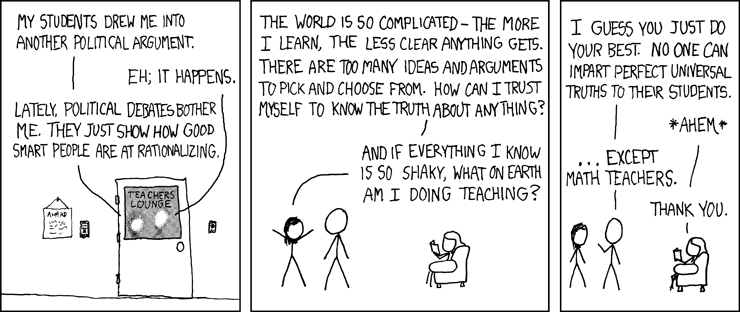
Math and Truth #hashtag

 |
| XKCD.com |
Wednesday, October 9, 2013
Love and Mathematics / EduBlogger (ED504)
Dan Meyer's Blog (dy/dan) is the center of my blogosphere. He not only brings in his own content, but he is great about aggregating other posts that he has read. On my latest visit to, dy/dan, I came across a link to Sarah Hagan's blog and a couple of posts that she had written.
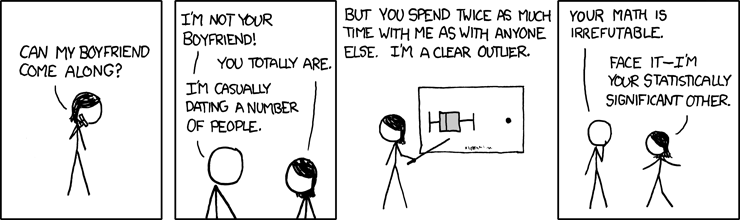
The first post I came across was about Relations and Functions. In the example she used in class, she stated that if Bob is dating Jill and Sue, then he's not in a functional relationship. If you wanted to see the relationship described as ordered pairs, it would look like {(Bob, Jill), (Bob, Sue)} -> Not a function. The example made me laugh and apparently made her students laugh, too. It activated existing schema surrounding the phrase "functional relationship", even if the example was based upon the social norms of rural Oklahoma. The use of example instantly got me thinking about XKCD.
We can always make use of humor as a way of gaining students attention and the the use of familiar language to convey mathematical meaning, even if it is built around puns.
Another recent posting was titled Good Things is a Great thing. In the attempt to build a positive classroom environment, Ms. Hagan takes a few minutes each Monday morning to have students share one good thing that has happened to them. Originally, the Okie thought it was a bit hokey, but the students have latched onto it. The post got me thinking about the importance of building relationships between students and the teachers. We are teaching math to people. The emphasis is on the students, not the content. Getting the students to talk about themselves and their interests is going to be a necessary condition before they are likely to engage in a conversation about mathematics. Starting off with good things helps to make students comfortable in the classroom.
The first post I came across was about Relations and Functions. In the example she used in class, she stated that if Bob is dating Jill and Sue, then he's not in a functional relationship. If you wanted to see the relationship described as ordered pairs, it would look like {(Bob, Jill), (Bob, Sue)} -> Not a function. The example made me laugh and apparently made her students laugh, too. It activated existing schema surrounding the phrase "functional relationship", even if the example was based upon the social norms of rural Oklahoma. The use of example instantly got me thinking about XKCD.
 |
| XKCD: Greatest Comic Ever |
Another recent posting was titled Good Things is a Great thing. In the attempt to build a positive classroom environment, Ms. Hagan takes a few minutes each Monday morning to have students share one good thing that has happened to them. Originally, the Okie thought it was a bit hokey, but the students have latched onto it. The post got me thinking about the importance of building relationships between students and the teachers. We are teaching math to people. The emphasis is on the students, not the content. Getting the students to talk about themselves and their interests is going to be a necessary condition before they are likely to engage in a conversation about mathematics. Starting off with good things helps to make students comfortable in the classroom.
Monday, October 7, 2013
In the year 2000 / Tech in my placement (ED504)
I have a very short commute most mornings to my placement because, as I have previously mentioned, my placement school is the very high school that I graduated from a decade ago. This has given me the ability to compare how the use of technology has changed in the school since I attended.
We have added two more computer labs since I attended. One computer lab is new, while one of the "new" computer labs came from dividing an oversized computer lab into two smaller labs. Each classroom features the same 27 inch TV mounted to the wall from when I was walking down the halls. Nowadays the morning announcements feature much better graphics, including green screen backgrounds for the students/anchors sitting at their mock news desks. Clearly, the TV and communication classrooms have upgraded their equipment. A wireless network spans the entire school and a handful of new routers were installed over the summer to help make the coverage more reliable.
Inside the math classroom, little has changed in terms of technology. The overhead projector has been replaced by a Doc-Cam, LCD projector and a laptop combination. Every classroom I have seen has a similar setup for the projector. We can contrast that with the blackboards that hang next to the projector screen; we still use chalk in most of the classrooms. We have a classroom set of TI-81 calculators (The TI-81 was discontinued in 1996). My mentor teacher has a pair of Windows ME laptops set up in the corner of the room in case we ever need to use them for student projects. The technology insides the classroom itself has not changed much.
One noticeable addition is the use of Skyward for managing attendance and grades. I have already heard from a few students who monitor their grades and assignments on a daily basis. Skyward also features a calendar with students homework in them. If a student misses a day they can download any handouts that they missed in class. The teachers and the students are connected. Another feature of technology in my placement is our use of the flipped classroom. Ten years ago, most students had dial-up or nothing. Now there is an expectation that all students will be able to watch videos online at home.
The ubiquity of students' cell phones is another technological change that I have noticed in my placement. Most of the students have a smartphone. Most of their smart phones have cracked screens. Many students wear earbuds like a piece of clothing. Most of my students think that if they put their cell phone under their desk that they can text and I won't notice.
There are a few things missing from my placement. We do not have a full time media specialist. The doors to the library are locked before lunch. Also, as I previously noted, we have a wireless network in the school. On the other hand, we don't have laptops. The teachers have laptops, but students do not. We don't have a one-to-one technology policy. We don't even have a laptop cart. We have WiFi throughout the school so that teachers don't have to bother about plugging in an ethernet cord to their computer and so that students don't have to use their cell phone data plan when are watching videos on the internet. I see technology in my placement, but I am not sure we use technology to further student learning any better than we did a decade ago.
One noticeable addition is the use of Skyward for managing attendance and grades. I have already heard from a few students who monitor their grades and assignments on a daily basis. Skyward also features a calendar with students homework in them. If a student misses a day they can download any handouts that they missed in class. The teachers and the students are connected. Another feature of technology in my placement is our use of the flipped classroom. Ten years ago, most students had dial-up or nothing. Now there is an expectation that all students will be able to watch videos online at home.
The ubiquity of students' cell phones is another technological change that I have noticed in my placement. Most of the students have a smartphone. Most of their smart phones have cracked screens. Many students wear earbuds like a piece of clothing. Most of my students think that if they put their cell phone under their desk that they can text and I won't notice.
There are a few things missing from my placement. We do not have a full time media specialist. The doors to the library are locked before lunch. Also, as I previously noted, we have a wireless network in the school. On the other hand, we don't have laptops. The teachers have laptops, but students do not. We don't have a one-to-one technology policy. We don't even have a laptop cart. We have WiFi throughout the school so that teachers don't have to bother about plugging in an ethernet cord to their computer and so that students don't have to use their cell phone data plan when are watching videos on the internet. I see technology in my placement, but I am not sure we use technology to further student learning any better than we did a decade ago.
Sunday, October 6, 2013
Google Autocomplete of the Day 10/6/13 #hashtag

Saturday, October 5, 2013
Google Autocomplete of the Day 10/5/13 #hashtag

Podmaster /Tech Tools (ED504)
"You can call me at my new New York phone number" is going to be a Facebook post of mine one of these days, just so I can trick my friends into thinking that I'm moving to a different country (New York is practically a different country).
How did I get a phone number in New York? I got it through the magic of Google Voice. Google Voice is an internet phone service. It is free for domestic calls and can be added onto an existing Google/Gmail account. Not only does Google Voice let me make phone calls from my computer, but it will forward calls to my cell phone. In fact, I can have Google Voice forward calls to six different phones.
Another magical feature about Google Voice is the recording features. Voice mails are recorded, transcribed and e-mailed to my Gmail account. The quality of the transcription varies from call to call, but at the very least I can usually pick out the name and some of the details. For example, the other night I got a voicemail that read "Hello Mr. Nickel. If you can give me a call back. I really need that money and I'll Albert 30 caps okay. Have a good day..." I could see the caller's number and got the basics of the call; someone was calling to remind me that I owed them money, although the part about "Albert 30 caps okay" was actually about breaking my knee caps. The transcriptions still need a little work.
Probably the most interesting feature is the call recording option. With the push of a button, a lovely female voice will tell my caller that the conversation is now being recorded. It gives me the option of recording interviews, saving my best explanations or keeping track of a conference call so that I could back and later listen to what we were talking about. So, now, not only will the NSA be recording my phone calls, but I can, too.
Here are some possible uses for Google Voice in Education
- Create a hotline. Because the phone number can be forwarded to six different phones, it could be shared with six different teachers or six different coaches. The JV football coaches could have one number that a player could call and reach the next available coach. Similarly a group of math teachers could set up a call line for math help. Users can automatically set up a schedule so that the phone won't ring at four in the morning, too.
- Student interviews. Anytime a student needs to interview someone for a project, they can do it over the phone and have a recording of the process.
- Leave a message. Teachers could have the phone number and just always leave it in Do Not Disturb mode. They could post a daily outgoing voicemail to pass information onto students or they could have students call in and leave a message requesting the homework problems they wanted to go over on the next day.
The other audio tool that I explored was Audacity. If using Google Voice was like playing checkers, then using Audacity was like playing chess. Anyone can play chess, but it it hard to be good at chess. Similarly, I had no problem using Audacity. I was able to record audio files, import some background music and cut some of my "Ummms", "Okays" and silence from an interview I recorded via Google Voice (Thank you Dr. Taylor). I even played around with some of the effects by having the music fade out. If you need to edit audio, Audacity is free and users can easily combine clips from multiple files into one audio file. If you want to master how to use Audacity, on the other hand, get working. It's going to take a while.
While working with podcasts, I came across two that were particularly interesting. NPR's Planet Money is something that I have listened to for years. When I tutored economics, I would make copies of some of the episodes and give them to students so that they could hear about the concepts they were reading about in their text. In the process of researching Math Podcasts, I found very little in terms of useful audio podcasts. However, I did come across the BBC's "More or Less". It is loosely related to math. They talk about making sense of statistics in the news. While it might not be directly related to solving linear equations or completing the square, listening to the stories they talk about could be an exercise in developing quantitative reasoning skills for students.
Subscribe to:
Posts (Atom)